 Google Drive
 OneDrive
下面我们将演示如何免费在线给 PDF 文档添加文字水印. 适用于包括 Mac 在内的所有桌面平台.
第 1 步:选择你的 PDF 文档
上传您的文件
文件通过加密连接安全上传. 文件保持安全. 处理后,它们将被永久删除.
不想上传您的文件并离线处理它们?
Try Sejda Desktop. 与在线服务功能相同,且文件永远不会离开您的计算机.
点击“上传”并从您的本地计算机选择文件.
将文件拖放到页面上也有效.
Dropbox 或 Google Drive 文件
您也可以从 Dropbox 或 Google Drive 中选取 PDF 文件.
展开“上传”下拉菜单并选择您的文件.
第 2 步:添加文字水印
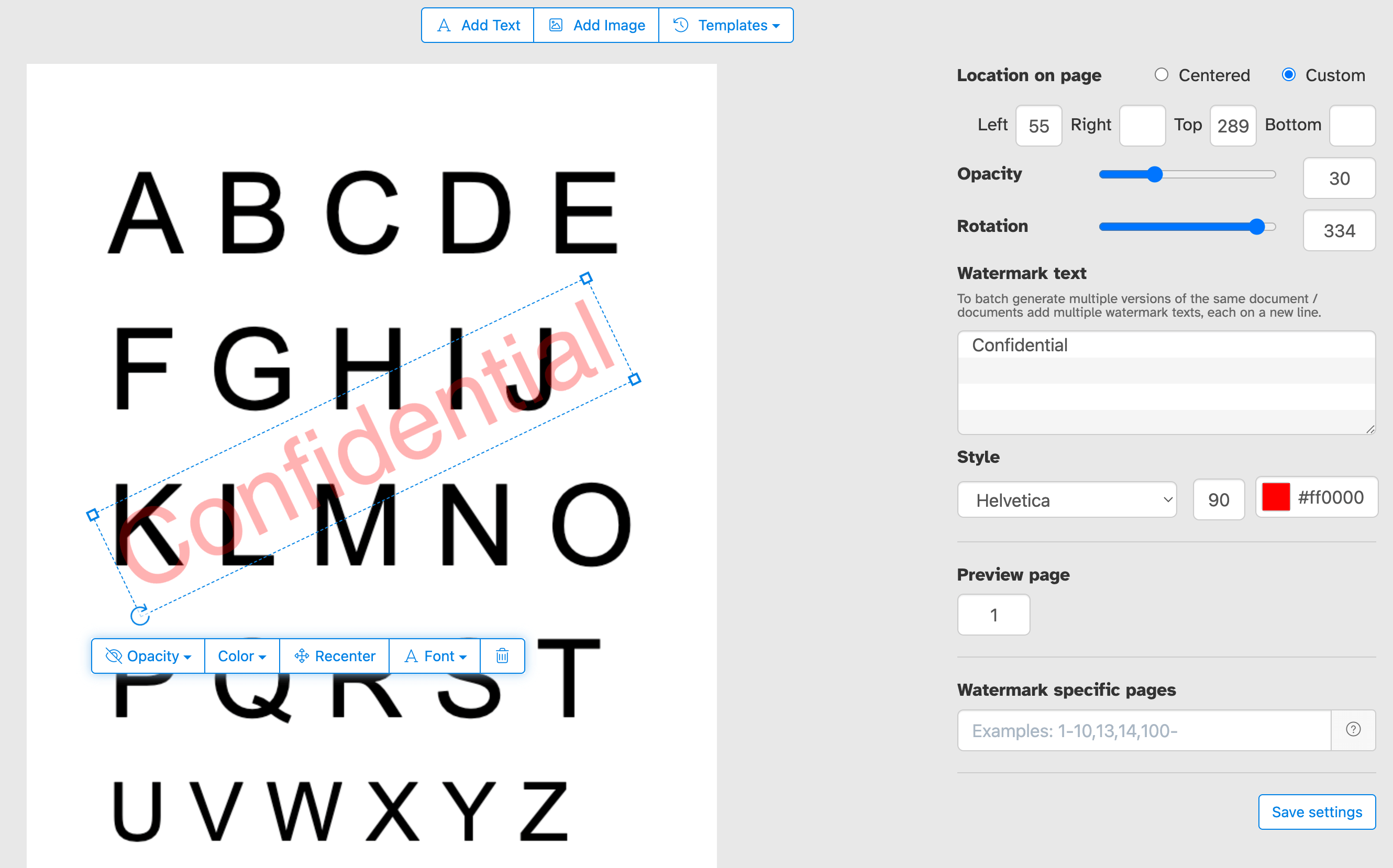
点击 PDF 页面顶部的 'Add Text' 按钮. 你应该会看到文字水印已添加.
点击它来编辑文字. 输入 'Draft' 或 'Classified' 试一试.
第 3 步:更改文字大小、旋转角度和页面位置
点击并拖动文字水印来更改在 PDF 页面上的位置
拖动旋转手柄来旋转文字水印.
点击并拖动侧边的缩放手柄来更改字体大小.
第 4 步:更改文字颜色、透明度和字体
点击文字水印以显示关联菜单.
你可以更改水印透明度,让文字变得更透明或更不透明.
也可以配置水印文字颜色和使用的字体.
仅为部分 PDF 页面添加水印
将水印应用于文档的每一页,或选择自定义页面范围. 无论你是只需标记第一页、最后一页还是特定的一组页面,你都可以精确控制水印出现的位置,而无需拆分或重新组装你的 PDF.
精确控制水印在页面上的位置
将你的水印放在你想要的确切位置. 在页面预览中点击并拖动到任何位置,或输入精确的 X 和 Y 坐标,实现像素级的精准放置.
为你的 PDF 盖上“机密”、“草稿”、“样本”或任何自定义标签,以控制文档的呈现和共享方式. 添加你的公司名称、版权声明或 logo 以强化品牌形象. 无论你是为了保护敏感的商业文档、标记进行中的文件,还是为交付给客户的成果打造品牌,我们都能让你轻松地在每一页传达正确的信息.
一次性为多个 PDF 文档添加水印或应用多个标记
在单个会话中为多个 PDF 文件添加水印,节省时间. 批量 Upload 文档,应用一次水印设置,然后一起下载所有已盖章的文件. 非常适合需要持续高效地处理大量 PDF 的团队和企业.
你也可以提供一批文字水印,一次性应用到一组文档中.
PDF 水印模板
将你的水印设置保存为模板,并在需要时随时重用. 一旦配置好你喜欢的文字、字体、颜色、大小、不透明度和位置,就可以存储该设置,只需点击一下即可应用到未来的文档,无需每次从头调整设置. 非常适合定期在多个文档中应用一致的水印.