 Google Drive
 OneDrive
Below we show how to convert PDF pages to JPG, PNG or TIFF images.
-
ファイルをUpload
ファイルは暗号化接続で安全にUploadされます. ファイルは安全に保護されます. 処理後、ファイルは完全に削除されます.
ファイルをUploadせず、オフラインで作業したいですか?
Try Sejda Desktop. オンライン版と同じ機能で、ファイルがPCから出ることはありません.'Upload'をクリックしてPCからファイルを選択.
ファイルをページにドラッグ&ドロップしてもOKです.
Dropbox または Google Drive のファイル
Dropbox や Google Drive からも PDF を選択できます.
'Upload'のドロップダウンを開いてファイルを選択してください.
-
Select an image format
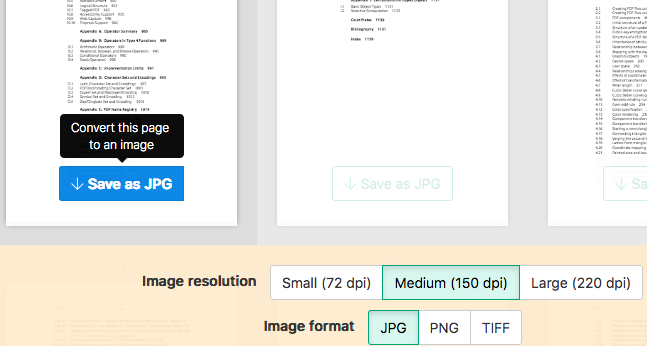
By default PDF is converted to JPG. Alternatively, choose to save your PDF as PNG or TIFF.
-
Select image resolution
Choose between 220 dpi, 150 or 75 dpi. Larger resolution (220 dpi) will output larger images.
-
Choose pages to convert
Click to select pages to convert. By default all pages in the PDF document are converted.
Quickly convert just a few pages?
Press the
Save as JPGbutton on the PDF page to quickly save it as an JPG image. Other image formats also supported.![]()
-
Save your changes
Click the
Convertbutton and thenDownloadan archive containing all the images.