
Help & Knowledge Base
Customizing Result File Names
Special keywords can be used as placeholders in the output file names, to be replaced with dynamic values during the execution.
A trivial example is prefixing each document with the page number, when splitting.
[CURRENTPAGE]
A reference to the current page number in the input document.
Example: [CURRENTPAGE###] will generate filesnames like 001.pdf, 002.pdf.
Example: [CURRENTPAGE##] generates 01.pdf, 02.pdf, etc.
[TIMESTAMP]
Ensures unique output filenames, being replaced with current date & time.
[FILENUMBER]
Ensures unique output filenames, replaced with a file number according to the output order.
Example: [FILENUMBER###] generates 001, 002
Example: [FILENUMBER13] starts with the counter at 13, generating 13, 14,
etc.
[BASENAME]
Does not ensure unique output filenames, and it must be used together with other placeholders ensuring unique names. It is replaced with original name of the input document, without the extension.
Example: [CURRENTPAGE]_[BASENAME] would generate 1_input-file.pdf, 3_input-file.pdf,
etc.
[BOOKMARK_NAME]
This pattern is replaced by current bookmark's name. Only applicable in the "Split by bookmarks" tool.
[BOOKMARK_NAME_STRICT]
Same behavior as [BOOKMARK_NAME] with the difference that non-alphanumberic characters are
removed.
Example: [CURRENTPAGE]-[BOOKMARK_NAME] would generate 1-Introduction.pdf, 4-Chapter
1.pdf, etc.
[TEXT]
This pattern is applicable only in the "Split by text" tool. It is replaced with the text found in the page area selected.
Example: [CURRENTPAGE]-[TEXT] would generate 1-Invoice 3456789.pdf, 4-Invoice
234567.pdf, etc.
[TEXT1], [TEXT2], etc.
This pattern is applicable only in the "Rename" tool. It is replaced with the text found in the selected area.
Example: [TEXT2]-[TEXT1] would generate John Doe-Invoice 3456789.pdf, Jane Doe-Invoice
234567.pdf, etc.
Sejda Desktop Enterprise Install
To deploy Sejda Desktop in an enterprise environment using a pre-configured volume license key use this command:
msiexec /i sejda-desktop_x.y.z_x64.msi LICENSE_KEY="1234-ABCD-1234-ABCD"
Any options provided will be configured machine-wide and will apply for all users on the system.
| LICENSE_KEY | License key | LICENSE_KEY="1234-ABCD-1234-ABCD" |
| LOCALE | UI language | en, es, de, fr,it or pt |
| UPDATE_CHECK | Disables checking for new versions | UPDATE_CHECK="false" |
| DISABLED_FEATURES | List of features to be disabled | DISABLED_FEATURES="edit.whiteout" |
| EULA_ACCEPTED | Accept EULA and no longer prompt on first use | EULA_ACCEPTED="true" |
| AUTO_REPORT_ERRORS | Configure automated error reporting and no longer prompt on first use | AUTO_REPORT_ERRORS="false" |
Resetting Browser Zoom
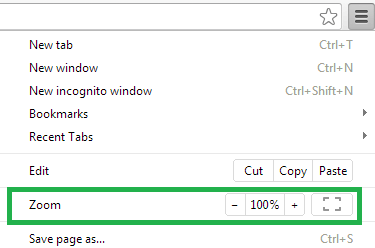
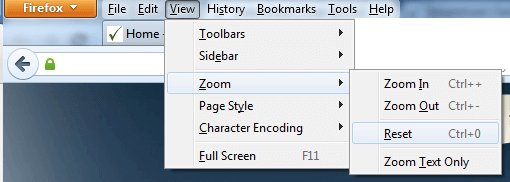
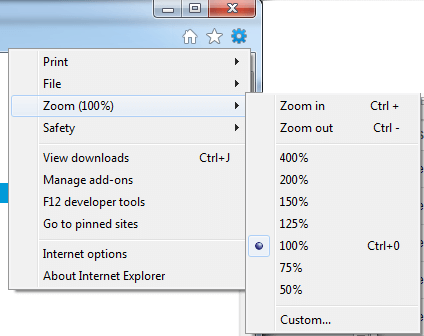
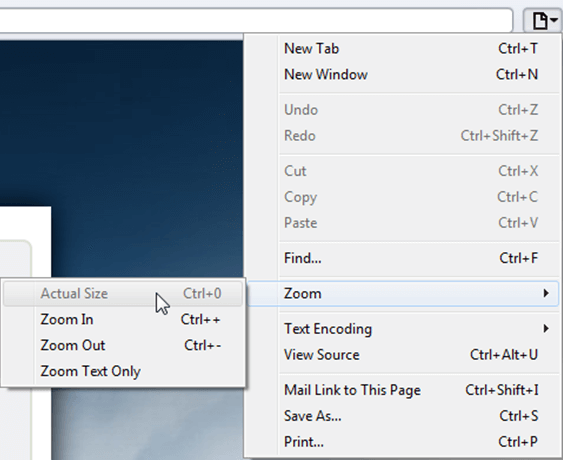
Choosing a zoom level of anything other than 100% (the default) can cause problems in pages where we render PDF pages.
If you are warned about it, reset the browser zoom to 100%.
The quickest way to return your browser to this zoom setting is to use the keyboard shortcut Ctrl + 0 on Windows or Cmd + 0 on Mac.
Additional browser-specific instructions for changing the zoom level are detailed below.
Chrome
Firefox
Internet Explorer
Safari
Sejda Desktop - Loading local fonts failed
Sejda Desktop fails to load the fonts installed on your system?
Windows 7: Please install "Platform update for Windows 7 SP1": https://support.microsoft.com/en-us/kb/2670838.
Linux: Please install libfontconfig-dev: sudo apt-get install libfontconfig-dev
Sejda Desktop - Add your fonts
Sejda Desktop can use your custom fonts when editing PDF documents.
1) Install the font on your system. See help for Windows or Mac.
2) Open Sejda Desktop, then open a PDF document with the Editor.
3) Type text on the page. From the context menu select "Fonts > More fonts".
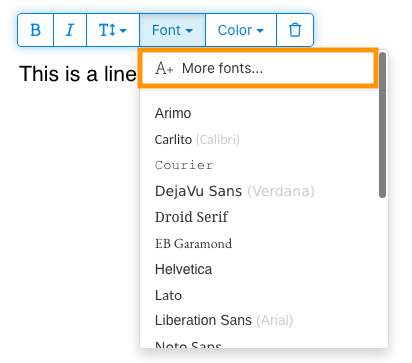
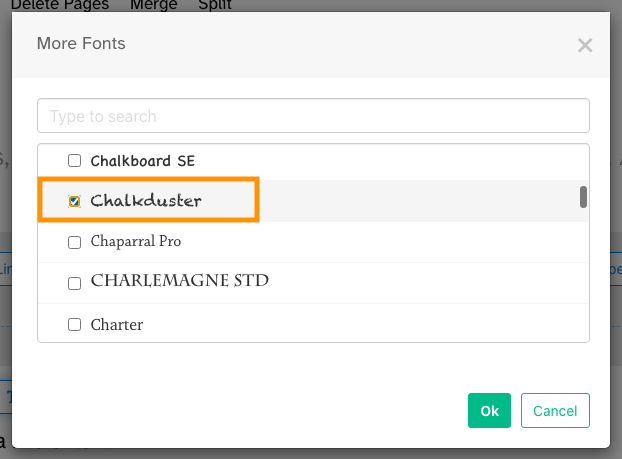
4) Select the font you would like to use and click "OK".
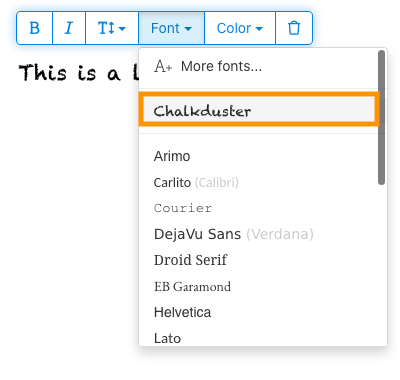
5) Click on the newly added font to use it for your text.
How long does it take for a refund to be processed?
It can take anywhere from 5-10 business days for a refund to show up on your bank account.
In some cases, the refund might be processed as a reversal, meaning the original payment will disappear from the account statement entirely and the balance will reflect as though the charge never occurred.
If you do not see the refund after 10 business days and you are still seeing the original charge on your bank statement, please reach out to support for more information.
How can you delete your FastSpring data?
If you've placed an order through FastSpring, our online authorized reseller & merchant of record, you can send your data erasure request to privacy@fastspring.com.
Malwarebytes interfering with Sejda Desktop?
Do you have Malwarebytes installed?
Please try temporarily turning Malwarebytes off and see if that solves the problem: Instructions here
You can report this problem with Malwarebytes: Report false positive
Could not convert: Page uses CAPTCHAs
The website you are trying to convert uses CAPTCHAs to block automated robots (such as our converter) from visiting their website.
There is no work around this.
See if the browser extension helps with your use-case:
HTML to PDF browser-extension
Install Linux OCR engine
Sejda Desktop does not ship with an embedded OCR engine on Linux, it uses the one available on the system.
To install an OCR engine, please run the following command:
sudo apt-get install -y tesseract-ocr tesseract-ocr-all
Once the command completes, return to Sejda Desktop and run your OCR task again.
Install Linux OCR language data
The OCR engine is installed successfully, but it is missing language data.
To install language data, please run the following command:
sudo apt-get install -y tesseract-ocr-all
About 667M of data will be downloaded and installed.
Once the command completes, return to Sejda Desktop and run your OCR task again.
系統要求我輸入 owner password
為什麼要求我輸入密碼?
某些 PDF 文件帶有安全性設定,限制了列印、複製文字、編輯或新增註解等操作. 這些限制由文件建立者設置,用於控制內容的使用與分享方式.
當我們偵測到 PDF 有這些限制時,會提示您輸入 owner password. 輸入此密碼可解鎖文件並授予所有功能與權限的完整存取權. 此步驟確保只有獲授權的人員可以修改或移除原作者設定的限制.
什麼是 owner password?
Owner password 由 PDF 建立者設置,以防止對文件進行未經授權的更改. 它與 user password 不同,後者是限制開啟整個文件. 如果您有 owner password,表示您擁有該文件的完整權限.
如果我沒有 owner password 怎麼辦?
如果您沒有 owner password,您將根據 PDF 中的限制繼續擁有受限的存取權.
要獲得完整存取權,請獲取該文件的解鎖版本.
如何避免每次都要重複輸入 owner password?
您可以使用 PDF unlocker 工具來移除文件的權限限制. 你只需要做這一次. 之後你就不會再被要求輸入這份文件的擁有者密碼了.
在 Google Chrome 中開啟 PDF,按下 Ctrl+P 列印,在右上角的「目的地」選擇「另存為 PDF」,然後點擊「儲存」.
購買付費方案可以解決這個問題嗎?
不行,即使你有我們的付費方案,系統還是會要求你輸入擁有者密碼.
你能告訴我擁有者密碼嗎?
不,我們不知道你文件的擁有者密碼. 擁有者密碼是由建立文件的人設定的,與你的登入密碼不同.
我無法編輯或轉檔掃描文件
為什麼掃描文件無法編輯或轉檔?
當你掃描紙本文件來製作 PDF 時,掃描器會擷取每一頁的影像. 這個過程會將文字、圖形和版面轉換成嵌入在 PDF 中的單一影像檔. 不同於標準 PDF 的文字是個別可選取的,掃描 PDF 會將每一頁視為一張大圖.
由於掃描 PDF 中的文字是影像的一部分,PDF 編輯器無法直接辨識或修改. 軟體只會看到一堆像素,而不是可辨別的字母或單字. 這讓你無法像在一般文字 PDF 中那樣編輯段落或進行修改.
如何判斷文件是否為掃描檔?
判斷方法之一是用 PDF 檢視器開啟它,並嘗試用滑鼠選取文字. 在可編輯的 PDF 中,你可以透過點擊並拖曳游標來選取文字. 如果你無法選取文字且整頁看起來像張圖片,那很可能就是掃描文件.
註:有些掃描文件經過 OCR 處理變成「可搜尋」掃描檔,其中的文字可以被選取和搜尋. 然而,這些仍屬掃描檔,無法像標準 PDF 那樣進行編輯或轉檔.
我確定我的文件不是掃描檔
有些文件看起來像掃描檔,是因為內容是以影像形式嵌入在頁面中. 這可能發生在從螢幕截圖建立的文件,或文字被轉換為外框時.
雖然技術上這些不算是掃描檔,但它們的運作方式很相似. 很遺憾,我們也不支援編輯或轉檔這種類型的文件.
購買付費方案可以解決這個問題嗎?
不行,升級到付費方案也無法讓你編輯或轉檔掃描文件. 不論你的訂閱層級為何,都不支援編輯或轉檔掃描件.
我確定我以前可以編輯這份文件
我們從未支援過編輯或轉檔掃描文件. 如果你以前能編輯該文件,可能是因為它當時匯出 PDF 的方式與現在不同.
Sejda Desktop 因為權限問題失敗
此錯誤有 2 個常見原因:權限不足或防毒軟體干擾.
權限不足: 你可能需要以管理員權限執行 Sejda Desktop. 右鍵點擊應用程式,然後選擇「更多」>「以管理員身分執行」.
防毒或安全軟體: 試著暫時停用防毒軟體,看看是否有助於解決問題.
在 Chromebook 上安裝 Sejda Desktop
可以使用 Linux 開發環境(也稱為 Crostini)在 Chromebook 上安裝 Sejda Desktop.
要求
你的 Chromebook 必須啟用 Linux 開發環境. 要啟用它,請前往 Settings → Advanced → Developers → Linux development environment 並按照設定步驟操作.
並非所有 Chromebook 都支援 Linux. 舊款或低階型號可能沒有此選項.
1. 下載 Linux (.deb) 版本
2. 在 Terminal 中安裝
開啟 Linux Terminal 應用程式並執行:
cd ~/Downloads
sudo dpkg -i sejda-desktop_*.deb
sudo apt -f install
3. 執行它
sejda-desktop
或從 ChromeOS 啟動器中的 Linux 應用程式資料夾啟動它.
故障排除:應用程式無法開啟
如果 Sejda Desktop 沒有出現或無法開啟視窗,請安裝缺失的 GUI 庫:
sudo apt install -y libgconf-2-4 libatk1.0-0 libatk-bridge2.0-0
OCR 功能
Linux 上的 Sejda Desktop 使用系統 OCR 引擎.
請參閱安裝 Linux OCR 引擎的說明