
 Google Drive
 OneDrive
Below we show how to rotate a pdf
Uploadați fișierele Dvs
Fișierele sunt uploadate în sigurantă pe o conexiune criptată. Fișierele rămân în sigurantă. După procesare sunt sterse permanent.
Preferi sa nu uploadezi fișierele și sa lucrezi cu ele offline?
Try Sejda Desktop. Aceleasi functionalitati ca și serviciul online, dar fișierele nu părăsesc niciodata calculatorul tău.
Click 'Upload' și selecteaza fișiere de la tine de pe computer.
Poti faci și drag & drop la fișiere pe pagina.
Fișiere din Dropbox sau Google Drive
Poti selecta fișiere PDF din Dropbox sau Google Drive.
Expandeaza butonul 'Upload' și selecteaza fișierele.
Step 2: Select pages to rotate
Pages can be rotated 90° clockwise, 90° counter-clockwise or 180° (flipped horizontally)
Rotate all pages
If you want to rotate all pages in the document, make sure All pages is selected. Then, click the rotation to be applied: 90°, 90° or 180°
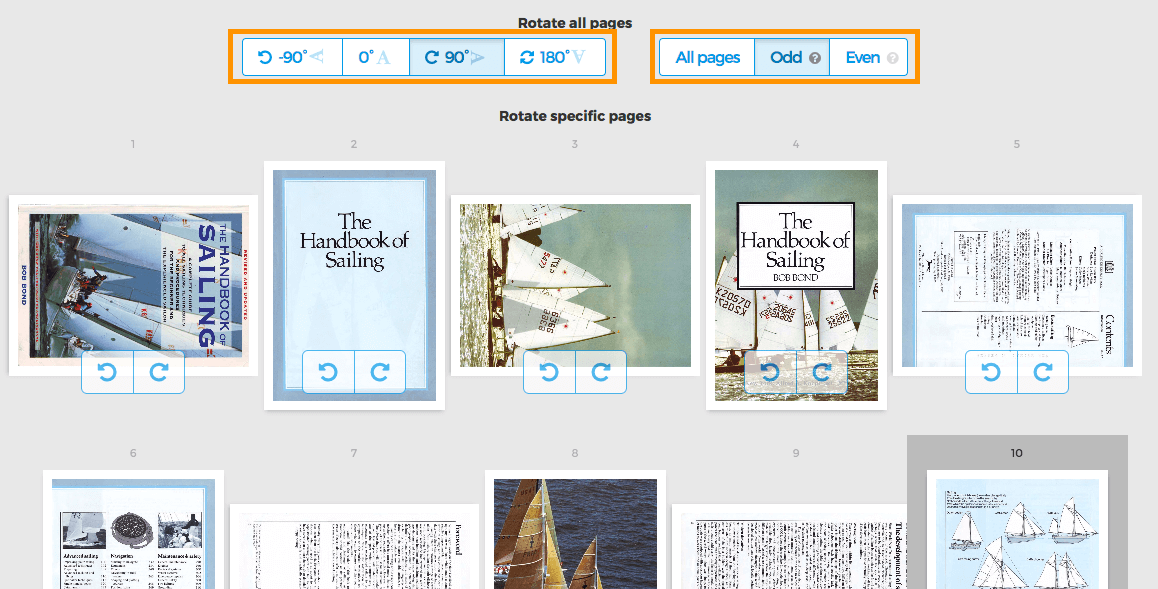
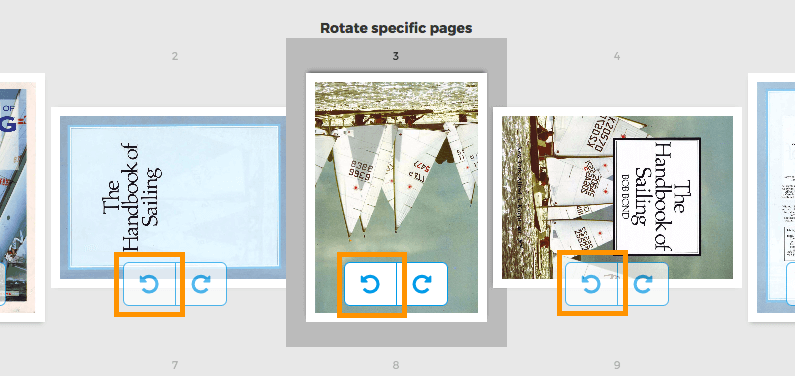
Rotate specific pages
Each page has two buttons to rotate that single page: or
Rotate only odd or even pages
Rotating only odd pages (2,4,6, etc) or all even pages (1,3,5) can also be done. Select either Odd pages or Even pages